Optimization: Culling
DunGen includes a built-in visibility culling system to minimize how many rooms (tiles) are rendered at once. To use it, add the Culling Camera component to your player camera (Add Component > DunGen > Culling > Culling Camera).
Culling Strategies
Several strategies are supported, each with different performance trade-offs. Select one using the Strategy dropdown on the Culling Camera component.
Adjacency Culling
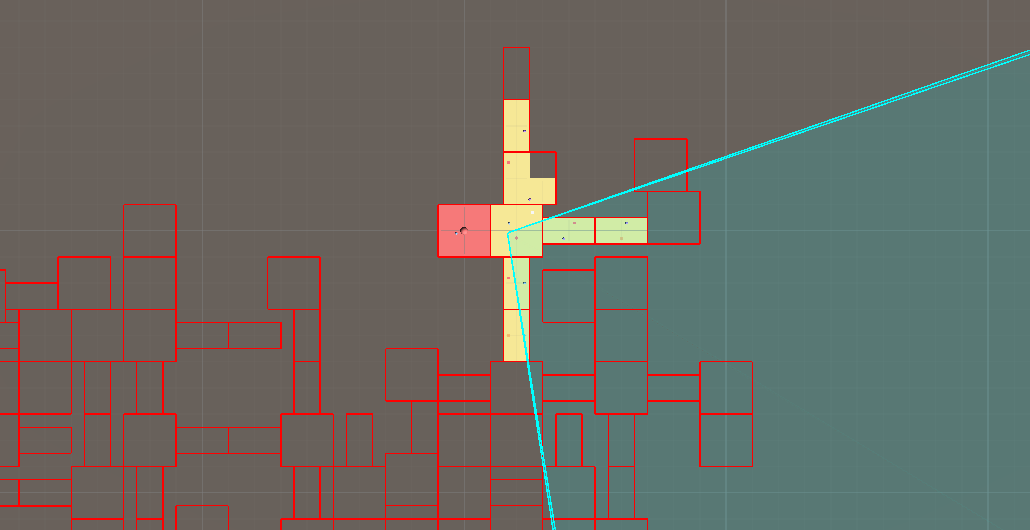
Tile depth = 2. Cyan area is the player's camera frustum.
Adjacency culling shows only the room the player is in plus nearby rooms (outward recursively up to a configured depth). Everything else is hidden.
It offers consistently high performance and very stable CPU cost, but at low depths the player could notice rooms popping in through open doorways. Auto-closing doors help hide this.
- Settings:
Character: Used as the centre of culling (usually the player).Adjacent Tile Depth:0: Only the current tile.1: Current tile + directly connected neighbours.2+: Expands breadth-first per step.- Higher values reduce culling effectiveness.
Cull Behind Closed Doors:- Stops traversal through doorways whose
Door.IsOpen == false. - Requires your door prefabs correctly update the
Doorcomponent. See Doors.
- Stops traversal through doorways whose
When to use it?
Use Adjacency Culling when:
- The camera is inside the dungeon (first-person, over-the-shoulder, tight third-person).
- You have (auto-)closing doors or narrow sightlines.
- You need highly predictable performance (e.g. VR, low-end hardware).
Avoid very large depths; if you need higher depths, consider Portal Culling instead.
Frustum Culling
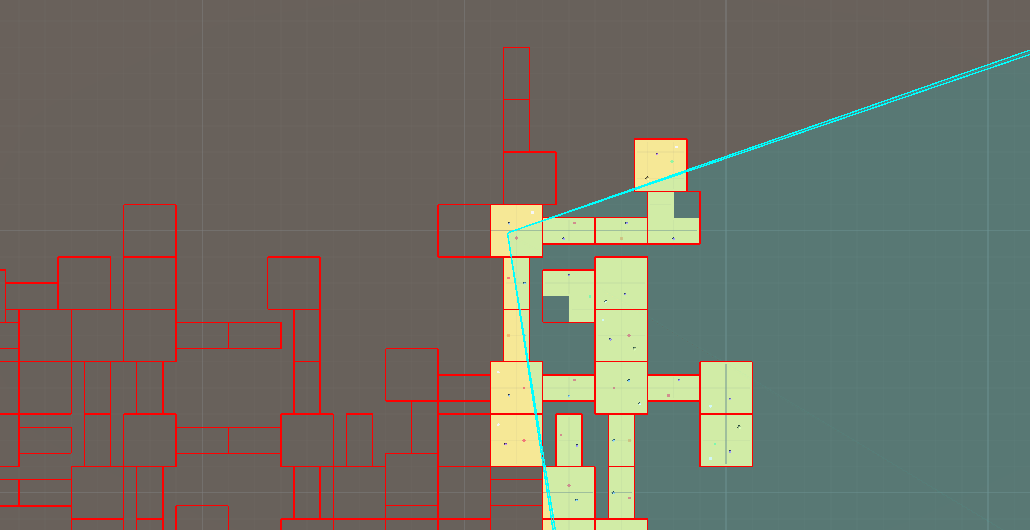
Cyan area is the player's camera frustum.
Frustum culling mirrors Unity's built‑in frustum culling but operates at the tile level: an entire tile is culled or shown based on the bounds of the tile instead of testing each renderer individually. It typically hides fewer tiles than the other strategies.
When to use it?
Choose Frustum Culling when:
- The camera is outside or significantly above the dungeon (top-down / isometric).
- Door-based occlusion is ineffective (mostly open layouts).
It is less aggressive, so gains may be modest.
Portal Culling
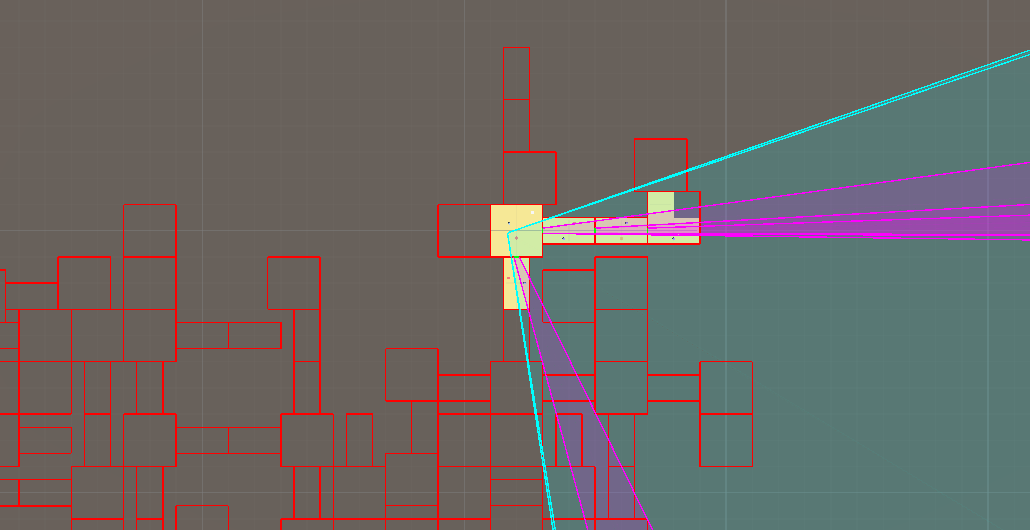
Cyan area is the player's camera frustum. Magenta areas are projected frustums through visible portals.
Portal culling projects the camera frustum through visible doorways (treating them as portals). A room is visible if it is directly seen or seen through a chain of doorways. The number of visible rooms changes dynamically with player orientation: looking at a blank wall may show only one room; looking down a long corridor may reveal many.
When to use it?
Use Portal Culling when:
- The camera resides inside the dungeon tiles (first-person or tight third-person).
- You have long corridors / aligned doorways that create deep sightlines and you want them rendered only when actually looked down.
- Pop-in must be minimized while still culling aggressively when the player faces occluding geometry.
- Doors may stay open and adjacency depth would otherwise need to be large. Performance Notes:
- CPU cost varies with how many portals are in view and recursion depth (worst case: looking into a hub with many doorways, or a long corridor).
- Ensure doorway geometry (portal rectangles) closely matches openings; oversized bounds reduce effectiveness.
Avoid Portal Culling if:
- The camera is top-down/outside the dungeon.
- Most rooms are fully open (few occluding walls) — Frustum or Adjacency may then be simpler.
Choosing the Right Strategy
Use this section as a quick decision aid:
- Where is the camera?
- Inside / immersive view (FPS / TPS) → Prefer Adjacency or Portal.
- Above / detached (top-down / isometric) → Frustum (others may under‑cull or malfunction).
- Are doors common and usually closed?
- Yes → Adjacency (low depth) is typically best.
- Are there long, aligned sightlines you only want when actually viewed?
- Yes → Portal Culling.
- Do you need extremely predictable frame times (e.g. VR)?
- Yes → Adjacency (fixed traversal cost).
- Are memory / draw call limits tight but CPU budget small?
- Adjacency (cheap CPU, strongest average cull).
Rule of Thumb
- Start with Adjacency (depth 1–2). If players notice voids where rooms should be, try Portal Culling.
- If your camera ever leaves interior space or has a bird's-eye view, switch to Frustum Culling.
- Profile worst-case scenes (open hubs) for Portal Culling to ensure recursion cost is acceptable.
Comparative Summary
- Adjacency: Deterministic cost, strongest average culling, possible visible pop-in without door occlusion.
- Portal: Adaptive, best visual fidelity vs overdraw, variable CPU cost.
- Frustum: Simplest, lowest variability, weakest culling aggressiveness.
Global vs Per-Camera Culling
By default, the Culling Camera uses global culling (Per Camera Culling unchecked), where the rendering state of each room is set once from the point of view of the camera (there should be only one culling camera if using global culling). This is the best option for performance, but may not be feasible if you have multiple cameras rendering the scene.
When Per Camera Culling is checked, DunGen will instead toggle the visibilities of each visible room one per-frame, per-camera. This allows for multiple cameras to render the scene, but at the cost of performance.
As a rule of thumb, keep Per Camera Culling unchecked unless you need it.
Alternatives & Integration
If the built-in culling doesn't meet your needs, consider:
- Third-Party Assets: Tools like SECTR (integrates directly with DunGen) provide advanced portal / sector systems.
- Custom Integration: Derive from
DunGen.Adapters.CullingAdapterand implementPrepareForCulling. DunGen invokes this during post-processing, letting you feed visibility data into another system.