Advanced Features: Generation Pipeline
For most users, DunGen's default generation pipeline will be more than sufficient for generating dungeons. However, if you need more control over the generation process, DunGen provides a way to customize the pipeline through scripting.
Overview
DunGen's generation pipeline is made up of a series of steps that are executed in order to create the final dungeon layout. The core pipeline steps are in a fixed order, and you can derive custom types from the base pipeline steps to extend or override their functionality.
Extension steps provide a way to insert custom behaviour before or after an existing step, allowing you to augment the generation process with your own logic without having to override one of the core steps.
Additionally, a generation pipeline contains a list of services that are made available to all pipeline steps. These services provide shared functionality that can be used throughout the generation process to perform tasks such as finding potential doorway pairs and handling collisions.
Creating a Custom Generation Pipeline
A custom pipeline can be created in the project tab (Create > DunGen > Generation Pipeline). This will create a new asset that you can configure in the inspector.
There are two ways to apply your custom pipeline:
- Assign it to a
DungeonFlowasset by setting theCustom Pipelinefield in the inspector. - Assign it directly to the dungeon generation settings (such as on the
RuntimeDungeoncomponent and theGenerate Dungeonmenu window) by setting thePipeline Overridefield in the advanced section of the inspector.
Once assigned, DunGen will use your custom pipeline instead of the default one when generating dungeons.
Anatomy of a Generation Pipeline
Services
Services are shared components that provide functionality to the various pipeline steps. They are passed in directly from the pipeline asset at the start of the generation process and remain available until the process is complete.
Creating a custom service involves making a new C# class that implements a specific interface (see table below). Once created, you will be able to select your custom service from the dropdown in the pipeline asset inspector.
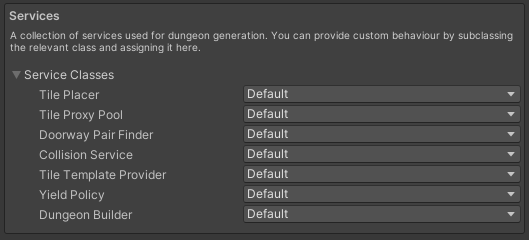
| Service Name | Description | Interface |
|---|---|---|
| Tile Placer | Places TileProxy instances in the DungeonProxy. |
ITilePlacer |
| Tile Proxy Pool | Manages a pool of TileProxy instances for use during generation. |
ITileProxyPool |
| Doorway Pair Finder | Finds potential pairs of doorways between tiles for connections. | IDoorwayPairFinder |
| Collision Service | Handles collision detection between tiles during placement. | IDungeonCollisionService |
| Tile Template Provider | Given a reference to a tile prefab, returns a TileProxy template. |
ITileTemplateProvider |
| Yield Policy | Manages yielding during generation to avoid blocking the main thread. | IYieldPolicy |
| Dungeon Builder | Constructs the final dungeon from the DungeonProxy, turning proxy instances into actual game objects. |
IDungeonBuilder |
Pipeline Steps
Pipeline steps are the individual stages of the generation process. Each step performs a specific task, such as placing tiles along the main path, or instantiating the final dungeon game objects.
Individual steps can be customised by deriving from the base step classes (see table below). Your custom type will then appear in the dropdown menu when selecting a step in the pipeline asset inspector. Any serialized fields on your custom step will be exposed in the inspector for configuration.
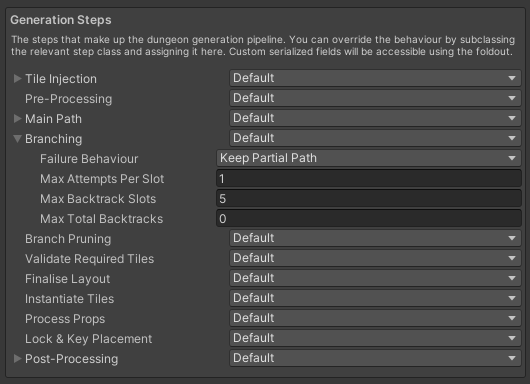
Core pipeline steps. Each step can have optional properties, which are exposed in the inspector.
| Step Name | Description | Base Class |
|---|---|---|
| Tile Injection | Stores information about injected tiles into the generation context before generation begins. | TileInjectionStep |
| Pre-Processing | Performs any necessary preprocessing on the generation context before tile placement begins. | PreProcessingStep |
| Main Path | Builds the main path of the dungeon according to the flow definition. | MainPathStep |
| Branching | Adds branching paths to the dungeon off the main path. | BranchingStep |
| Branch Pruning | Trims invalid tiles from the ends of branches to meet requirements. | BranchPruningStep |
| Validate Required Tiles | Ensures that all required tiles (e.g. injected tiles) are present in the dungeon. | ValidateRequiredTilesStep |
| Finalise Layout | Finalises the dungeon layout, making any last adjustments before building. | FinaliseLayoutStep |
| Instantiate Tiles | Instantiates the actual tile game objects in the scene based on the finalised layout. | InstantiateTilesStep |
| Process Props | Processes and places props within the instantiated tiles. | ProcessPropsStep |
| Lock & Key Placement | Places locks and keys within the dungeon according to the flow definition. | LockAndKeyPlacementStep |
| Post-Processing | Performs any necessary post-processing on the dungeon after instantiation. | PostProcessingStep |
Extension Steps
Extension steps allow you to insert custom logic before or after an existing pipeline step. This is useful for augmenting the generation process without having to override any of the steps.
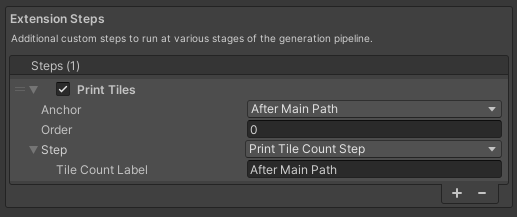
Extension pipeline step with custom properties.
To create an extension step, derive a new class from CustomGenerationStep. Your custom type will then appear in the dropdown menu when adding an extension step in the pipeline asset inspector. The checkbox can be used to disable the step without removing it.
- Anchor: Specified how this extension step is anchored to an existing core step (e.g.
Before All,After Main Path). - Order: Specifies the order in which this extension step is executed relative to other extension steps anchored to the same core step. Lower values are executed first.
- Step: The actual custom step to execute. Any serialized fields on your custom step will be exposed in the inspector for configuration.
Extension step names will appear in cyan in the pipeline step list to indicate at what point in the pipeline they are executed.
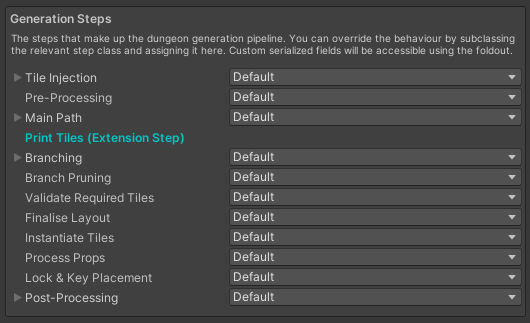
Custom extension step running After Main Path.
Example: Branching paths off the start tile
Usually, branches can't come off the start tile or other nodes in the graph. With this custom pipeline step, we can add branches off the start tile by running a custom branching step immediately after the main path step.
using DunGen;
using DunGen.Generation;
using DunGen.Generation.Steps;
using System;
using System.Collections;
using System.Collections.Generic;
using System.Linq;
using UnityEngine;
using static DunGen.Generation.PathBuilder;

[Serializable]
[SubclassDisplay(displayName: "Start Tile Branches")]
public class StartTileBranchesStep : CustomGenerationStep
{
    public override string DisplayName => "Start Tile Branches";

    public List<TileSet> TileSets = new List<TileSet>();
    public IntRange BranchCount = new IntRange(0, 1);
    public IntRange BranchDepth = new IntRange(1, 3);
    public int MaxAttemptsPerSlot = 10;
    public int MaxBacktrackSlots = 5;
    public int MaxTotalBacktracks = 10;


    public override IEnumerator Execute(GenerationContext context)
    {
        if(BranchDepth.Min < 1)
        {
            Debug.LogError($"Invalid {nameof(BranchDepth)} value. Minimum must be at least 1.");
            yield break;
        }

        var settings = context.Request.Settings;
        var startTile = context.ProxyDungeon.MainPathTiles[0];
        int branchId = -1; // Branching step uses 0 and up, so use negative numbers here to ensure uniqueness

        // We don't have enough doorways to create the minimum number of branches, so fail immediately
        if (startTile.UnusedDoorways.Count() < BranchCount.Min)
        {
            context.TilePlacementResults.Add(new NoMatchingDoorwayPlacementResult(startTile));
            yield break;
        }

        // Pick the number of branches to create
        int branchCount = BranchCount.GetRandom(context.RandomStream);

        for (int i = 0; i < branchCount; i++)
        {
            // Decide how long this branch should be
            int branchDepth = BranchDepth.GetRandom(context.RandomStream);
            TileProxy previousTile = startTile;

            // Configure the path builder
            var pathBuilderOptions = new PathBuilder.OptionsBuilder()
                .OnFailure(FailureBehaviour.KeepPartialPath)
                .MaxAttemptsPerSlot(MaxAttemptsPerSlot)
                .MaxBacktrackSlots(MaxBacktrackSlots)
                .MaxTotalBacktracks(MaxTotalBacktracks)
                .AttachTo(startTile)
                .Build();

            var builder = new PathBuilder(pathBuilderOptions);

            // Calculate placement parameters and propose a slot for each tile in this branch
            for (int j = 0; j < branchDepth; j++)
            {
                float normalizedDepth = (branchDepth <= 1) ? 1 : j / (float)(branchDepth - 1);
                var candidateTiles = TileSets.SelectMany(t => t.Tiles.Entries);

                int localBranchDepth = j;
                float localNormalizedDepth = normalizedDepth;

                builder.ProposeSlot(new PathBuilder.SlotSpec(
                    candidateEntries: candidateTiles,
                    isOnMainPath: false,
                    normalizedDepth: normalizedDepth,
                    placementParameters: previousTile.Placement.PlacementParameters,
                    onTilePlaced: (newTile) =>
                    {
                        newTile.Placement.BranchDepth = localBranchDepth;
                        newTile.Placement.NormalizedBranchDepth = localNormalizedDepth;
                        newTile.Placement.BranchId = branchId;
                        newTile.Placement.PlacementParameters = previousTile.Placement.PlacementParameters;
                        previousTile = newTile;
                    }));
            }

            yield return builder.Build(context);
            branchId--;
        }
    }
}
Custom generation pipelines are a powerful way to tailor DunGen's dungeon generation process to your specific needs. By creating custom steps and services, you can implement unique generation logic while still leveraging the core functionality provided by DunGen.