Advanced Features: Custom Post-Processing Steps
DunGen's generation process involves several stages: creating the main path, adding branches, placing props, handling the lock & key system, etc. Sometimes, you need to inject your own custom logic during this process, specifically after the main dungeon layout (Dungeon data structure) exists but before generation is fully marked as complete.
This is useful for:
- Integrating third-party systems (like pathfinding baking or custom culling setups) that need the final level geometry.
- Running complex analysis or modification routines on the generated
Dungeondata. - Implementing custom prop placement logic that depends on the overall dungeon structure.
- Performing tasks that need to happen after DunGen's built-in post-processing (like lock/key placement) but before the final
GenerationStatus.Completeevent fires.
DunGen offers three ways to add your custom post-processing logic:
- Registering Steps via Code: Use the
RegisterPostProcessHookmethod on theDungeonGeneratorfor fine-grained control. - Creating Custom Adapters: Derive a component from
BaseAdapterfor a more component-based approach, often used for integrations. - Post-Process Steps in a Custom Generation Pipeline: Define custom post-processing steps in a Generation Pipeline.
Post-processing steps registered via code or adapters are executed first (in the order defined by their priority, highest first), followed by any post-processing steps defined in a custom generation pipeline (which are executed in the order they appear in the list).
Method 1: Registering Steps via Code (RegisterPostProcessHook)
This method allows you to dynamically register a C# method to be called during the post-processing phase.
How it Works:
- Get a reference to your
DungeonGeneratorinstance. - Call the
generator.RegisterPostProcessHook()method, providing your callback method and configuration options. - DunGen will execute your callback method at the appropriate time during its post-processing phase.
The Method Signature:
Action<GenerationContext> callback: This is your custom method (or lambda expression) that will be executed. It receives theGenerationContextinstance as an argument, allowing you to access the current state of the generated dungeon.int priority: Determines the execution order. Higher priority numbers execute first. Steps with the same priority have an undefined execution order relative to each other.- Return Value: The method returns a
PostProcessHookobject that represents your registered step. You can use this object to unregister the step later if needed.
Example:
using DunGen;
using DunGen.Generation;
using DunGen.PostProcessing;
using UnityEngine;

public class MyCustomPostProcessor : MonoBehaviour
{
    // Assign your Runtime Dungeon component in the inspector
    public RuntimeDungeon RuntimeDungeon;

    private PostProcessHook hook;


    private void Start()
    {
        if (RuntimeDungeon == null)
            return;

        // Register our custom method with the default priority and store
        // the returned hook so we can unregister it later
        hook = RuntimeDungeon.Generator.RegisterPostProcessHook(MyCustomPostProcessLogic);
    }

    private void OnDestroy()
    {
        if (RuntimeDungeon == null)
            return;

        // Unregister our custom method
        RuntimeDungeon.Generator.UnregisterPostProcessHook(hook);
    }

    // This is the method that gets called by DunGen
    private void MyCustomPostProcessLogic(GenerationContext context)
    {
        Debug.Log("Running custom post-process step!");

        // Access the generated dungeon data
        Dungeon dungeon = context.Dungeon;

        // Perform your custom logic here
        Debug.Log($"Dungeon has {dungeon.AllTiles.Count} tiles.");
    }
}
Use Cases: Ideal for simple one-off post-processing tasks defined in specific scripts.
Method 2: Creating Custom Adapters (BaseAdapter)
This approach is more component-oriented and is the standard way DunGen integrates systems like Pathfinding and Culling. You create a new script that inherits from DunGen.Adapters.BaseAdapter.
How it Works:
- Create a new C# script.
- Make it inherit from
DunGen.Adapters.BaseAdapter. - Override the abstract
Run(GenerationContext context)method. This is where your custom logic goes. - Attach this new component script to the same GameObject that has the
RuntimeDungeoncomponent. - DunGen will automatically find all
BaseAdaptercomponents on that GameObject and execute theirRunmethods during the post-processing phase.
Adapter Properties:
Priority(Inspector Field): Inherited fromBaseAdapter. This integer value controls the execution order of all post-processing steps within the same phase. Higher priority adapters run first.
Example:
using DunGen.Adapters;
using DunGen.Generation;
using UnityEngine;

public class MyCustomAdapter : BaseAdapter
{
    protected override void Run(GenerationContext context)
    {
        Debug.Log($"There are {context.Dungeon.AllTiles.Count} tiles in the dungeon");
    }
}
Use Cases: Excellent for creating reusable integration components (like the built-in pathfinding/culling adapters), especially when the logic might need configuration via Inspector fields on the component itself. Easier to manage as self-contained units.
Method 3: Post-Process Steps in a Custom Generation Pipeline
For projects that use a custom Generation Pipeline, a custom post-process step can be added to the pipeline by creating a new class that implements the IPostProcessStep interface.
Example:
using DunGen.Generation;
using DunGen.PostProcessing;
using System.Collections;
using UnityEngine;

public class MyCustomPostProcessStep : IPostProcessStep
{
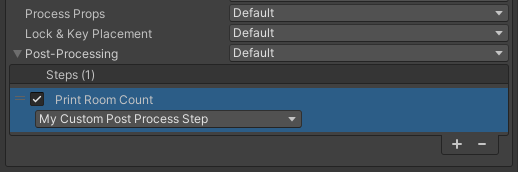
    public string DisplayName => "Print Room Count";


    public IEnumerator Execute(GenerationContext context)
    {
        Debug.Log($"Dungeon has {context.Dungeon.AllTiles.Count} rooms.");

        // Since this is a simple synchronous operation, we need to yield break to satisfy the IEnumerator return type
        yield break;
    }
}
This new class will then appear in the dropdown when configuring the Post-Processing step in your custom generation pipeline asset.
Choosing the Right Method
RegisterPostProcessStep:- Use when the logic is part of a script that isn't naturally attached to the
RuntimeDungeonGameObject. - Use when you need to dynamically add/remove steps based on runtime conditions.
- Best for simple, one-off post-processing tasks.
- Use when the logic is part of a script that isn't naturally attached to the
BaseAdapter:- Use for creating self-contained, reusable integration components (preferred for integrations like pathfinding, culling, etc.).
- Use when you want to configure the step via the Inspector (add public fields to your adapter).
- Generally simpler setup.
IPostProcessStepin a Custom Generation Pipeline:- Use when you already have a custom generation pipeline and want to keep all generation logic centralized.
- Use when you want to share the same post-processing step across multiple dungeons by reusing the pipeline asset.
- Best for complex generation workflows.
Custom post-processing provides a vital hook for tailoring the generated dungeon and integrating it fully with your game systems.